The most common mistakes in educational content digitisation include treating PDF viewing as a complete solution, adding unnecessary interaction, ignoring real classroom use, offering the same experience on every device and locking valuable content into a single technology platform.
Many publishers and education providers are moving their resources into digital environments.
Books can be opened in applications, videos can be linked to pages and interactive activities can be added.
Yet teachers may still use the platform only occasionally, content teams may struggle to make updates and the final product may fail to create the expected educational or commercial value.
The problem is rarely the idea of digitisation itself.
It is usually the way the project has been designed and managed.
Teams may focus on how the book will appear on screen without fully considering how it will be used in the classroom, how it will be updated or how it could create value across multiple products.
Mistake 1: Treating PDF viewing as digital transformation
A PDF viewer can provide a useful foundation for a digital textbook or interactive whiteboard application.
Teachers can open pages, zoom in, annotate content and follow the same sequence as the printed book.
However, when the system does little more than this, the learning experience remains unchanged.
What are the consequences?
- Learners remain passive.
- The potential of interactive whiteboards is underused.
- The product struggles to differentiate itself.
- The digital edition remains an add-on to the printed book.
- Teachers have little reason to use the platform regularly.
How can it be improved?
Not every page needs to become interactive.
Teams can identify the sections where digital technology can add real learning value and enrich those areas with questions, animation, simulation, classroom activities and explanatory feedback.
The goal is not to modify every page. It is to identify where digital design can create a better learning experience.
Mistake 2: Defining interaction as clicking
A resource can contain many buttons without being educationally interactive.
A learner may click an image to open an explanation. But when that action is not connected to a learning objective, it is only interface interaction.
What are the consequences?
- The content feels visually crowded.
- Learners do not know where to focus.
- Activities quickly become repetitive.
- Production costs increase without a similar increase in learning value.
- Teachers may not understand the purpose of the interaction.
How can it be improved?
Ask three questions before adding any interaction:
- What will the learner think about while completing it?
- Which learning objective does the action support?
- What feedback will the learner receive?
When these questions cannot be answered clearly, the interaction should be reconsidered.
Mistake 3: Applying the same activity formats to every subject
Templates make content production faster.
However, using templates without considering the subject can lead to hundreds of activities that feel almost identical.
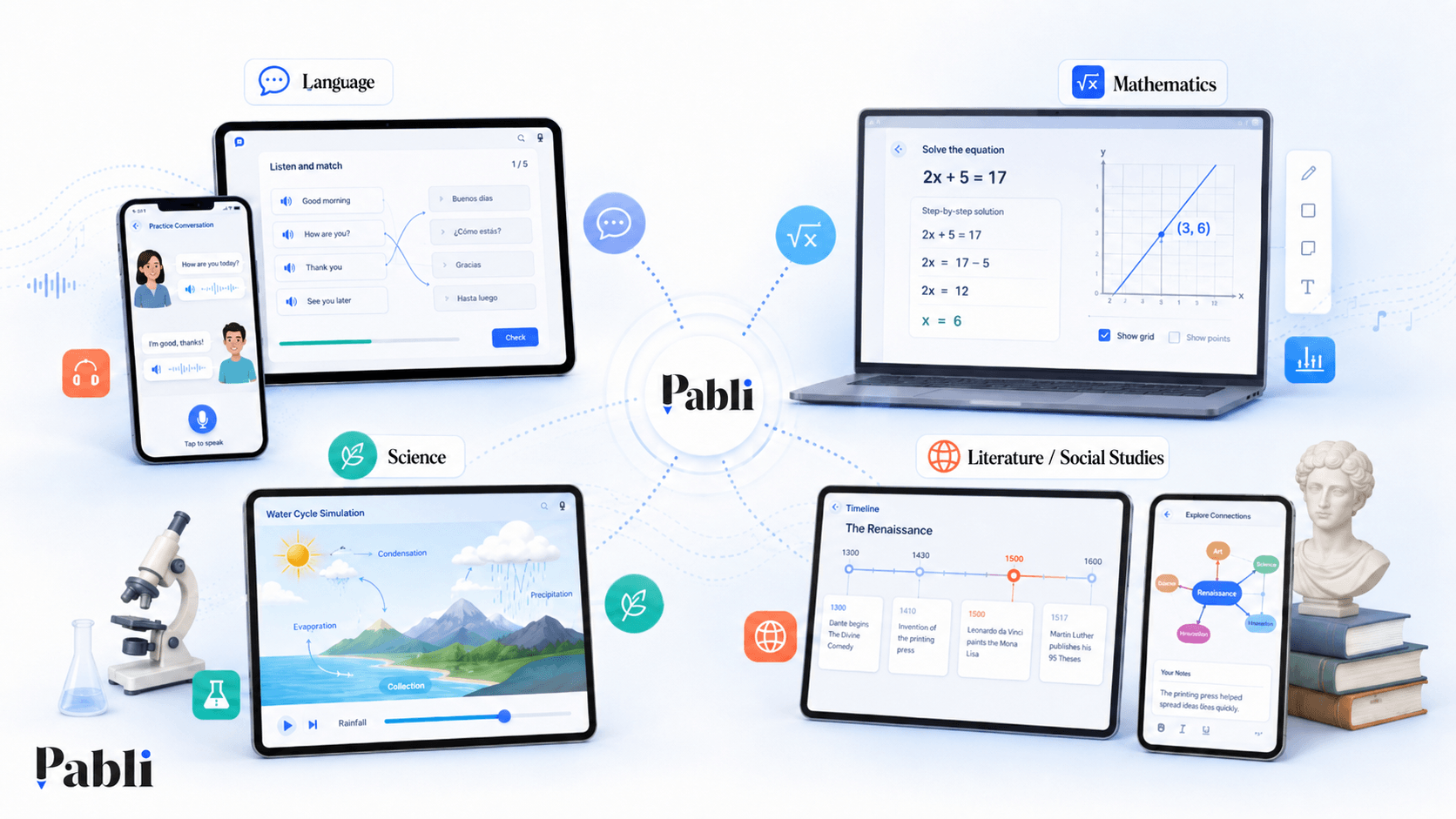
Language, mathematics, science and literature require different types of thinking.
What are the consequences?
- The interaction is weakly connected to the content.
- Subject-specific needs are overlooked.
- Learners become bored with repeated formats.
- The product becomes a template collection rather than a designed learning experience.
- The publisher’s subject expertise is not reflected in the digital product.
How can it be improved?
Choose interactions according to the subject and learning objective.
Mathematics may require step-by-step reasoning, science may benefit from simulation, language learning from listening and dialogue, and social sciences from timelines or cause-and-effect structures.
Templates should support production. They should not replace learning design.
Mistake 4: Ignoring the teacher’s real classroom context
Interactive whiteboard content is often tested at a desk under ideal technical conditions.
Classroom reality is different.
Teachers have limited time. They need to manage learners, control the content and maintain the flow of the lesson.
Complex navigation, small controls and slow loading times can discourage them from using the resource.
What are the consequences?
- Teachers use the application only as a PDF viewer.
- Interactive features remain undiscovered.
- The lesson flow is disrupted.
- Adoption rates remain low.
- Teachers return to printed resources or familiar tools.
How can it be improved?
Interactive whiteboard experiences should be tested in real classroom conditions.
Teachers should be able to access key functions in as few steps as possible, open activities quickly and return to the relevant page without difficulty.
A strong interactive whiteboard application should not create additional work. It should make the teacher’s existing lesson process easier.
Mistake 5: Using the same experience on whiteboards, mobile devices and the web
Responsive design is often treated as a matter of making the same interface larger or smaller.
But the difference between an interactive whiteboard and a smartphone is not only screen size.
Interactive whiteboards are generally used collectively and controlled by the teacher.
Smartphones are used individually, at close range and through touch gestures.
Desktop environments may support more detailed content and complex controls.
What are the consequences?
- Mobile screens become overcrowded.
- Text and controls remain too small on interactive whiteboards.
- Users see tools they do not need.
- The same content delivers a weak experience across multiple environments.
How can it be improved?
The content source can remain shared, but the interface and interaction model should adapt to the device.
Interactive whiteboards need large controls and whole-class activities. Mobile experiences need shorter sections, portrait layouts and individual progress.
Mistake 6: Making content dependent on the software
In some digital content projects, texts, images, questions and interactions are coded directly into the application.
Even a small wording change or new question requires developer support.
This may appear manageable at first, but it becomes a serious operational issue as the volume of content grows.
What are the consequences?
- Updates take longer.
- Production costs rise.
- Editors become dependent on development teams.
- Content cannot easily be reused elsewhere.
- New publications become harder to digitise.
- Minor changes require unnecessary release processes.
How can it be improved?
Content and software should be separated.
Editors and learning teams should be able to update texts, activities and media through an authoring or content management environment without changing the application code.
This turns digitisation from a one-off software project into a sustainable content operation.
Mistake 7: Locking content into a single platform
A publisher may spend years producing digital content on a platform that does not provide access to source files or meaningful export options.
When the organisation needs to change suppliers, the content may need to be rebuilt.
Technology will change over time. The organisation’s digital content assets should remain usable.
What are the consequences?
- Migration costs become high.
- Reuse across different channels is restricted.
- The organisation becomes dependent on the provider’s pricing and technology decisions.
- Years of digital content investment are placed at risk.
- Moving content to another LMS or application becomes difficult.
How can it be improved?
The following questions should be clarified before the project begins:
- Who owns the source content?
- Can the content be exported?
- Which output formats are supported?
- Can the content run in another LMS or platform?
- What happens to the content if the service is discontinued?
- Can the publisher access its own content library?
- Can the content be migrated to another provider?
Digital content should remain under the control of the organisation that owns it.
Mistake 8: Limiting feedback to “correct” and “incorrect”
Automatic assessment is one of the major advantages of digital learning content.
However, feedback that simply marks an answer as correct or incorrect misses an important learning opportunity.
When learners do not understand why they were wrong, they may repeat the same mistake.
What are the consequences?
- The activity becomes a scoring tool rather than a learning tool.
- Misconceptions remain unaddressed.
- Learners can guess until they reach the correct answer.
- The educational potential of digital feedback is lost.
- Incorrect reasoning remains invisible.
How can it be improved?
Provide answer-specific explanations, progressive hints and links back to relevant concepts.
Correct answers can also include a short explanation that reinforces why the response is right.
If a learner classifies the cause of a historical event incorrectly, for example, the feedback can explain the distinction between political and economic factors instead of simply revealing the right option.
Mistake 9: Treating content as complete after publication
Printed content may remain unchanged after publication.
Digital products create value partly because they can evolve.
Yet many teams fail to define what happens after launch.
What are the consequences?
- Errors remain live for too long.
- Curriculum changes are implemented slowly.
- User feedback is not reflected in the product.
- Older and newer resources become inconsistent.
- The digital experience loses relevance over time.
How can it be improved?
Define workflows for version control, editorial review, publishing and updates.
The organisation should know who can change each type of content and how those changes are approved and released.
Digital content should be managed as a living product rather than a completed project.
Mistake 10: Measuring success only by the number of activities produced
A team may create hundreds of interactive activities.
But the number is not meaningful when nobody knows whether teachers use them or whether they improve the learning experience.
What are the consequences?
- Teams continue producing low-value resources.
- Real user needs remain invisible.
- Return on investment cannot be evaluated.
- Product priorities become difficult to define.
- Content volume grows while usage remains low.
How can it be improved?
Production metrics should be evaluated alongside usage and outcome metrics.
Useful indicators may include:
- Content views
- Activity completion rates
- Teacher usage frequency
- Most-used activity types
- Drop-off points
- Learner answers
- Time required to update content
- Number of products in which a module is reused
- Production cost per resource
- Qualitative user feedback
The objective is not to produce the highest possible number of activities.
It is to create content that is used, updated and reused.
Mistake 11: Disconnecting the digital experience from the printed book
Teams may believe a digital product needs to move entirely away from the structure of the printed book in order to feel innovative.
In practice, teachers often use the printed and digital resources together.
When page references, topic order or the visual structure change completely, it becomes difficult to move between the two formats.
What are the consequences?
- Teachers lose time moving between printed and digital resources.
- Reaching the correct activity becomes more difficult.
- The learner’s textbook and the classroom screen feel disconnected.
- The digital product does not fit existing teaching practices.
How can it be improved?
The digital resource does not need to be an exact replica of the printed book. However, the relationship between them should remain clear.
The unit structure, topic sequence, page references and teacher guidance can remain connected.
The digital experience should add value to the printed resource rather than making the teacher’s primary reference harder to use.
Digital content maturity checklist
A digital learning project can be reviewed across five areas.
Content
- Are the learning objectives clear?
- Is the content modular?
- Can the same material be reused?
- Are interactions connected to learning goals?
- Is feedback explanatory?
- Does each media element serve a learning purpose?
User experience
- Can teachers reach content quickly?
- Is the interactive whiteboard experience suitable for classroom conditions?
- Has the mobile experience been designed separately?
- Are instructions easy to understand?
- Has the content been tested with real users?
- Is there a clear connection between the printed and digital resources?
Technology
- Is the content independent from the application code?
- Does it work across devices?
- Can standards-based outputs be created?
- Can it be transferred to other systems?
- Are performance and loading times acceptable?
- Can it be updated later?
Operations
- Are editing permissions clearly defined?
- Is there an editorial approval process?
- Is version history available?
- Can content be updated efficiently?
- Is usage data tracked?
- Can different teams collaborate effectively?
Ownership
- Does the organisation own the source content?
- Can the content be exported?
- Will it remain available if the provider changes?
- Can it be used across multiple products?
- Is the content library dependent on a single platform?
How does Pabli address these challenges?
Pabli approaches digital content production as a sustainable content operation—not simply as a one-off application project.
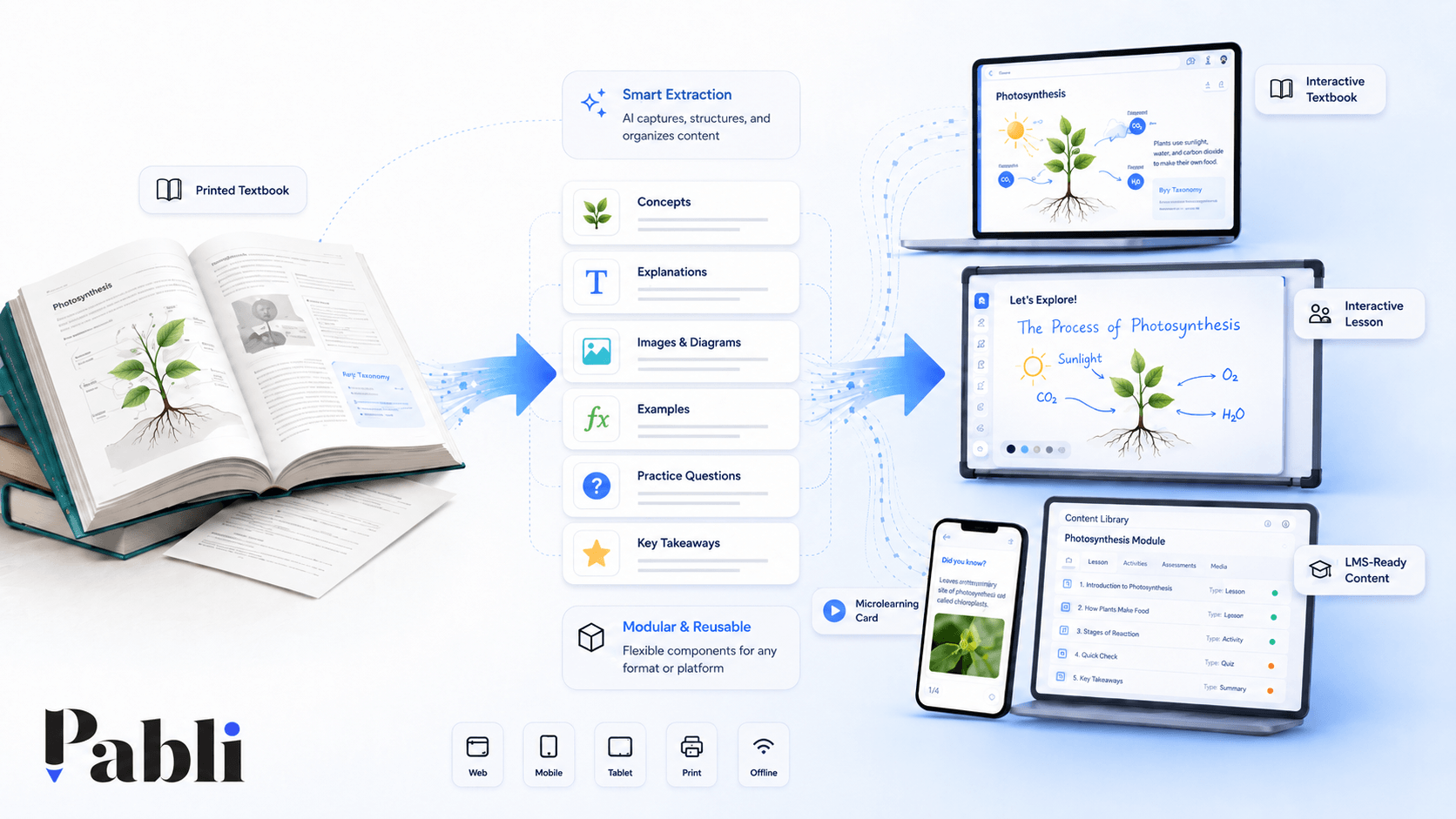
Existing materials can be analysed and transformed into different content modules through AI-assisted workflows.
Editors and education teams can update the content, add media and reuse existing components across multiple products.
With Pabli, publishers and education providers can:
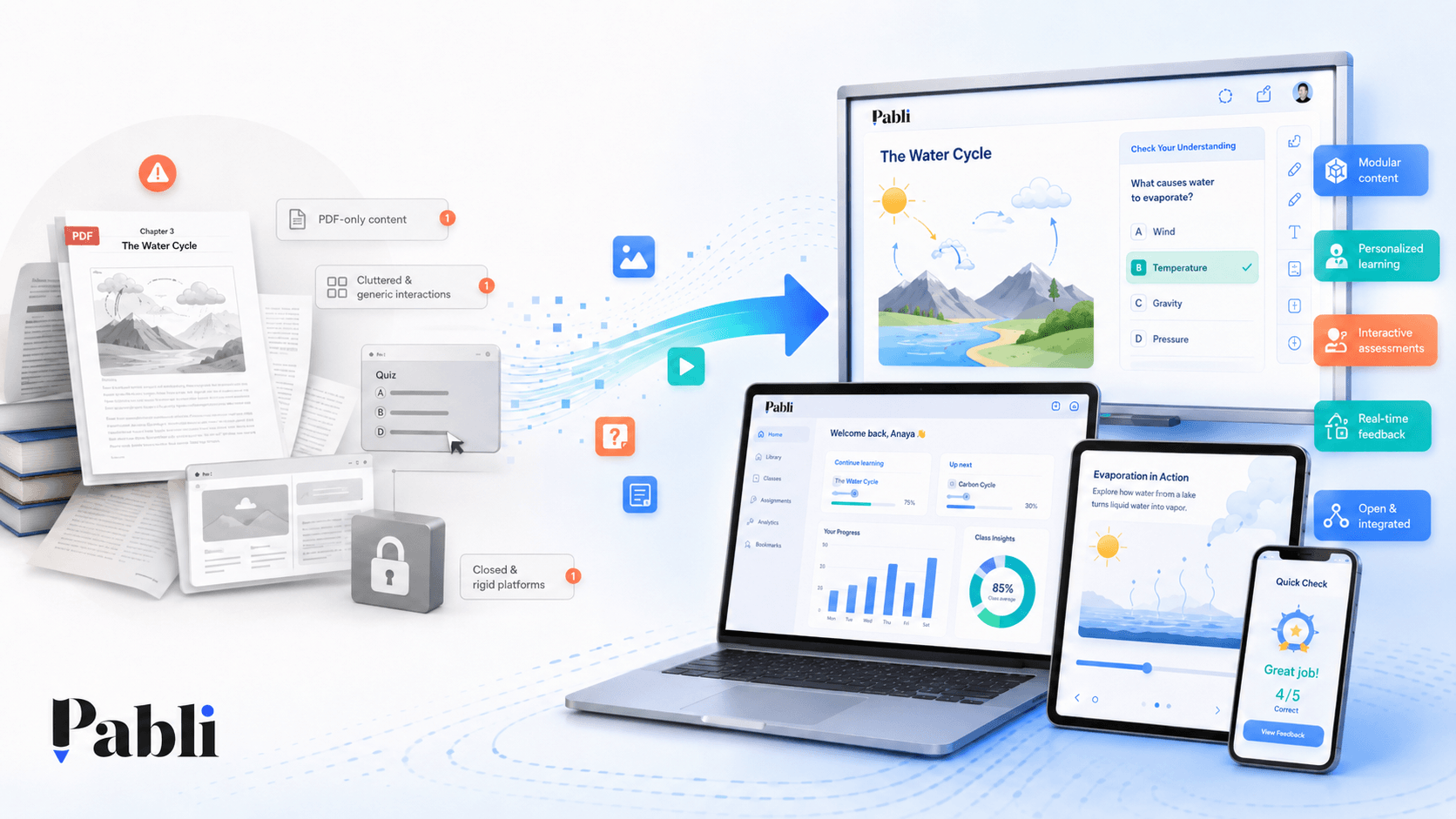
- Move beyond PDF-only experiences.
- Separate content from software.
- Create subject-appropriate interactions.
- Design distinct whiteboard and mobile experiences.
- Keep content up to date.
- Produce multiple digital products from the same source.
- Create portable, standards-based outputs.
- Retain control of their digital content.
This turns digitisation from a one-time production cost into a growing and reusable content asset.
Conclusion
The greatest mistake in educational content digitisation is treating it purely as a technical conversion.
Effective digital learning content requires learning design, user experience, technology, content operations and ownership to be considered together.
PDF viewing may be a useful beginning.
The real value emerges when the content is redesigned around the way teachers and learners will actually use it.
Pabli transforms existing educational materials into digital experiences that can be updated, reused and adapted across different learning scenarios—not simply pages that open on a screen.
Frequently Asked Questions
Where should an educational content digitisation project begin?
Begin by defining the target users, learning environment and learning objectives. Technology and interaction choices should follow those decisions.
Is it wrong to use ready-made templates?
No. Templates can accelerate production, but they should be adapted to the subject matter and learning objective.
Why is platform lock-in a risk?
When content cannot be exported, moving to a new provider may require complete redevelopment. This creates migration costs and places the content investment at risk.
Do content updates require a development team?
Not when content is separated from the software. Editors and education teams can update texts, questions, visuals and interactions directly.
How should the success of a digital content investment be measured?
In addition to production volume, organisations should consider usage, teacher feedback, completion rates, update speed, reuse and production cost per resource.